
How to Install the Pokémon Yellow Recomp (Gen1Recomp)
Install Gen1Recomp and play Pokémon Yellow natively on PC: the exact ROM SHA-1 it accepts, the Windows Defender false positive, and the fake site to avoid.
Gen1Recomp turns your own Pokémon Yellow cartridge dump into a native PC game. Here's the whole install, the traps, and a prompt you can hand your AI agent.
Gen1Recomp hit GitHub on July 18, 2026, a native PC recreation of Pokémon Red and Blue. Yellow landed the first week of August. It's sitting around 3,200 stars, Kotaku and XDA covered it,12 and a voxel mod turns Kanto into a little 3D diorama.
The install takes about five minutes once you have a legal ROM. Most of this post is the five things that can go wrong in those five minutes.
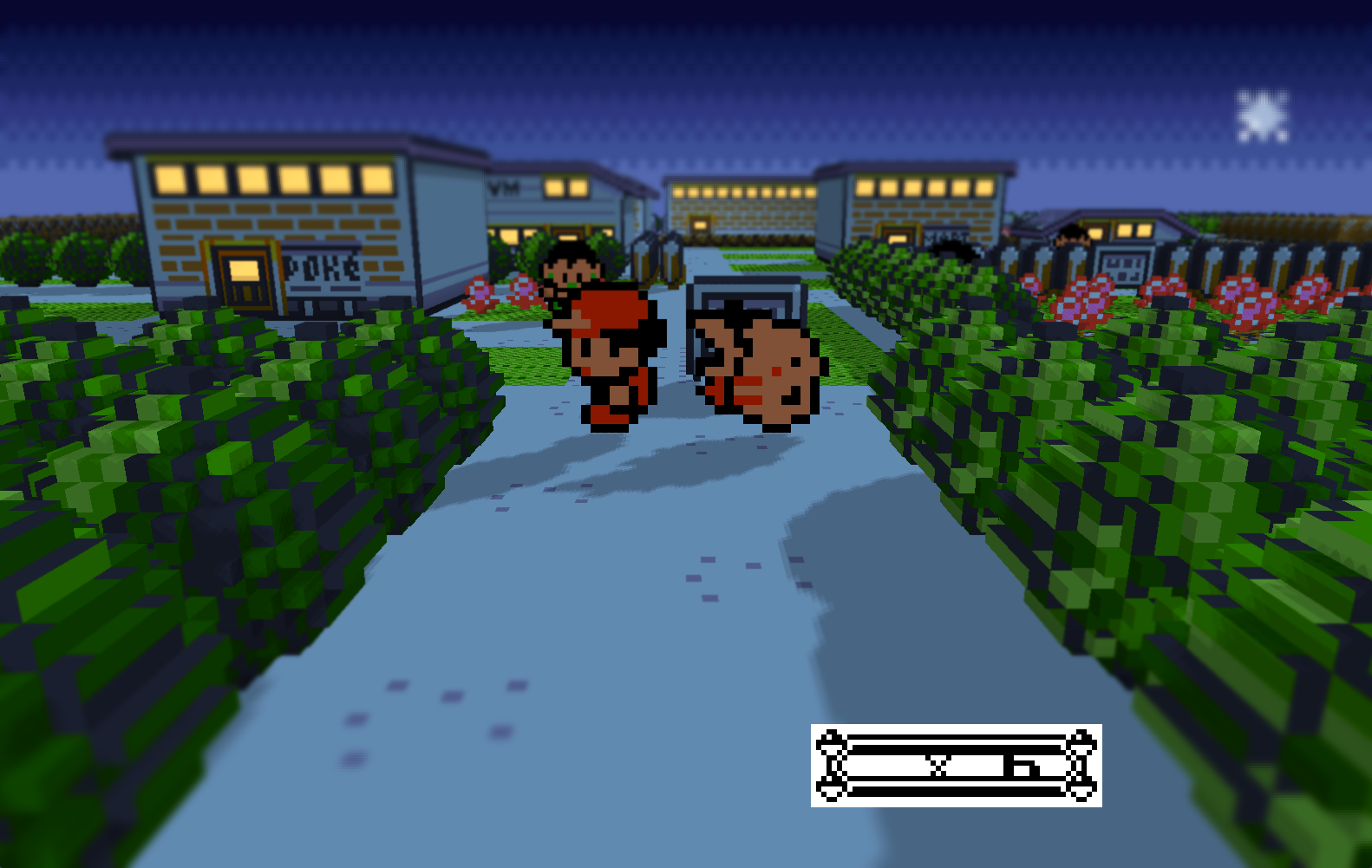
My install with the DramaticShape voxel mod. The base game looks like the original Game Boy version; the voxels come from the mod, covered below.
What is it?
A fan-made engine, written in Lua on LÖVE2D by a dev who goes by bryanthaboi. On first boot you hand it your ROM. It pulls the maps, graphics, and music into its own cache, then runs the game natively from there. The ROM gets checked, used once, and released. The download ships zero Nintendo assets and no emulator core, the same design that's kept the Zelda 64 recomp alive.3 MIT licensed, source in the open.
Don't confuse it with GB-Recomp/pokeyellow (a static recompilation of Yellow into C you compile yourself) or pret/pokeyellow (the disassembly both build on). Gen1Recomp is the one you can download and play.
What you need
- A computer. Builds exist for Windows, macOS, Linux, Android, iOS, Switch homebrew, and Xbox Dev Mode.
- The release zip from the official GitHub releases page.
- Your own Pokémon Yellow dump.
Download only from GitHub. gen1recomp.com looks official. It's an impersonator. The dev says the project has no connection to it and that it now serves adware. The GitHub repo and the project's Discord, nothing else.
The importer takes exactly one Yellow file: the canonical 1 MiB USA/Europe ROM, SHA-1 cc7d03262ebfaf2f06772c1a480c7d9d5f4a38e1. Trimmed dumps, ROM hacks, and bad downloads all bounce. Filename doesn't matter, only the hash does.4
All four accepted dumps:
| Game | Accepted SHA-1 |
|---|---|
| Yellow (US/Europe) | cc7d03262ebfaf2f06772c1a480c7d9d5f4a38e1 |
| Red (US) | ea9bcae617fdf159b045185467ae58b2e4a48b9a |
| Blue (US) | d7037c83e1ae5b39bde3c30787637ba1d4c48ce2 |
| Gold (US) | d8b8a3600a465308c9953dfa04f0081c05bdcb94 |
Check yours first:
# Windows
Get-FileHash .\yellow.gbc -Algorithm SHA1
# macOS / Linux
shasum yellow.gbcPaste the output here:
No file yet? The legal route is dumping a cartridge you own. I'd grab the Epilogue GB Operator ($49.99);5 the BennVenn Joey Jr (about $37) and insideGadgets GBxCart RW (about $30) also work. With the GB Operator: plug it in, insert the cart, open the Playback app, hit backup. Out comes your .gb file. Check it with the box above.
There's no digital copy to buy. The 3DS eShop was the last store selling Yellow and it closed in 2023.6 Downloading a ROM instead is copyright infringement even if you own the cart, so no links here.
Install it on Windows
- Grab
gen1recomp-0.2.7-windows.zipfrom the releases page. Releases ship almost daily, so take whatever's current. - Verify it: download
sha256sums.txtfrom the same release, runGet-FileHashon the zip, compare. Thirty seconds, and it settles the antivirus thing below. - Extract the whole zip. Don't run the exe from inside the zip preview.
- If Defender eats the exe as
Trojan:Win32/Wacatac!ml, that's a documented false positive (README, issue #621). Your step-2 checksum already proved the file is the one the project published. Restore it: Windows Security > Protection history. - Want portable saves? Drop an empty
portable.txtnext togen1recomp.exebefore first launch. Otherwise saves land in your app-data folder assave.lua. - Run
gen1recomp.exe, then pick your ROM or drag it onto the window.
You only need the ROM once. The app verifies the hash, builds its cache, and lets the ROM go. It never asks again.
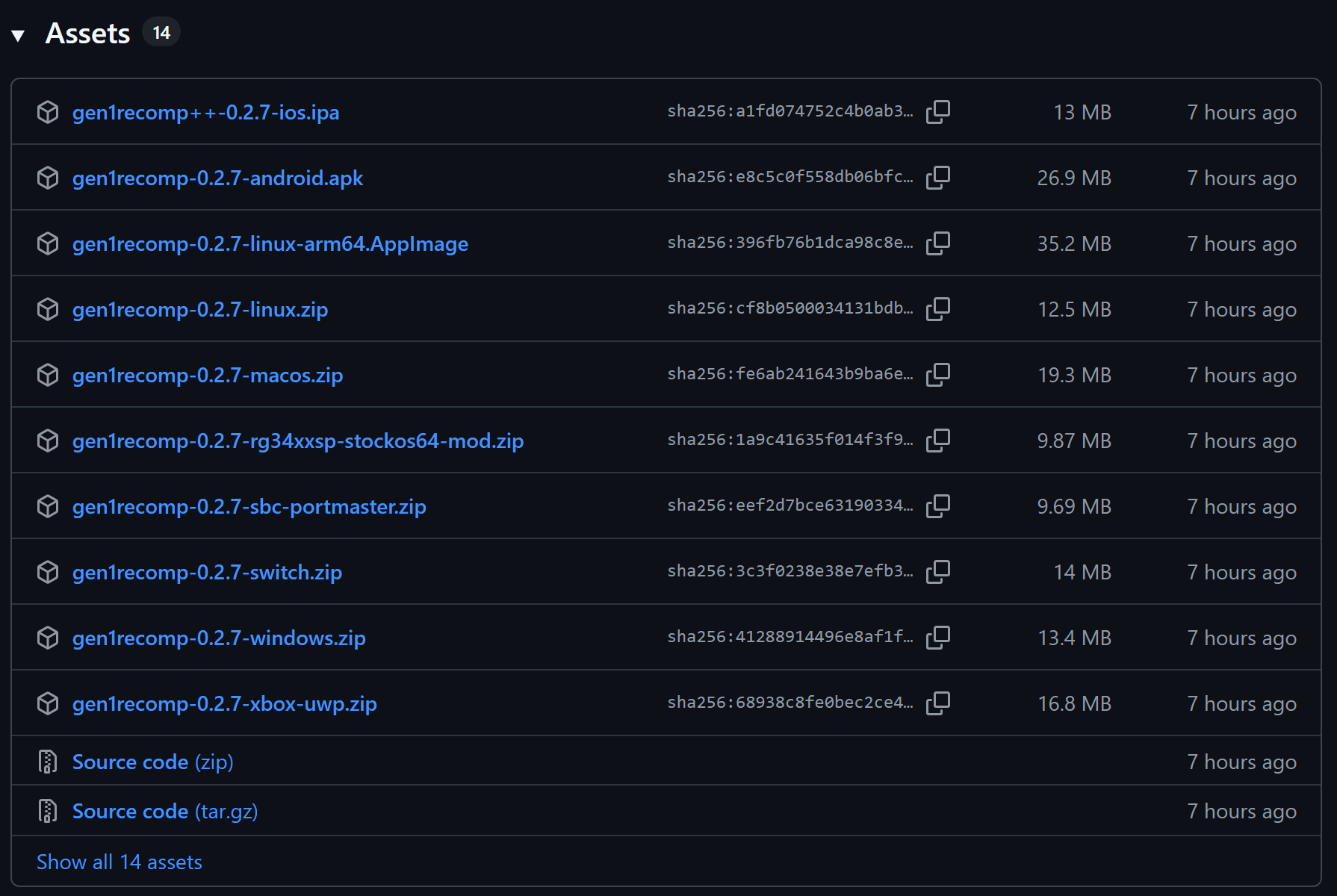
GitHub shows each file's SHA-256 right on the releases page, which makes step 2 easy.
In-game: arrows or WASD, Z is A, X is B, Esc is Start. Controllers just work. F1 and F2 are save states. START > LINK connects two copies over UDP for trades and battles; turn mods off first or it won't connect.7
How do I install it on Mac, Linux, Steam Deck, or Android?
Pick yours:
Download gen1recomp-0.2.7-windows.zip from the releases page.
- Extract the whole zip to a normal folder.
- Run gen1recomp.exe.
Download gen1recomp-0.2.7-macos.zip from the releases page.
- Unzip.
- Open the app.
Download gen1recomp-0.2.7-linux.zip from the releases page.
- Unzip.
- Run ./gen1recomp.
Download gen1recomp-0.2.7-linux-arm64.AppImage from the releases page.
- Make it executable: chmod +x.
- Run it.
Download gen1recomp-0.2.7-linux.zip from the releases page.
- Switch to desktop mode.
- Unzip.
- Run ./gen1recomp.
There is no official Steam Deck build. The Linux zip is the community answer.
Download gen1recomp-0.2.7-android.apk from the releases page.
- Sideload the APK.
Download gen1recomp++-0.2.7-ios.ipa from the releases page.
- Sideload it with AltStore.
Download gen1recomp-0.2.7-switch.zip from the releases page.
- Extract the zip and merge its switch folder into the root of your microSD card.
- Launch with a title override: hold R and press A on an installed game.
Needs custom firmware. A plain album launch can run out of memory, so use the title override.
Download gen1recomp-0.2.7-xbox-uwp.zip from the releases page.
- Enable Developer Mode on the console.
- Sideload the UWP package through the Device Portal.
Dev Mode only. This is not a Store app.
Then import your ROM on first boot. That part is the same everywhere.
Every build is on the same releases page: -windows.zip, -macos.zip, -linux.zip, -linux-arm64.AppImage, -android.apk, gen1recomp++-ios.ipa, -switch.zip,8 and -xbox-uwp.zip, plus sha256sums.txt.
The voxel mod
The screenshots everyone shares come from the DramaticShape voxel mod, a separate download. Mods live on the project's Discord: one thread per mod in the mods channel, download link in the first post.9 The mod's original GitHub is gone and only mirrors remain, so treat the Discord thread as the source of truth.
Install: open Mods in the launcher (the button next to the game tabs; F10 on desktop) and import the zip as-is. Don't extract it. Extracting it is the number-one way people break their install.10
Two things people miss: the 3D look can be off after install (pause menu, Options, set Colors to advanced, raise the voxel level),11 and first-person plus VR come from this mod, not the base app.12
If a modded game acts up, boot the plain game first so you know which half broke. Mod updates are delete-and-reimport.
Let your AI agent do it
Rather delegate? Copy this into Claude Code or any agent with shell access. It pins the official repo, refuses to download ROMs, and verifies both checksums. You still bring the dump. It's the same delegation pattern from how my AI agents ship code overnight.
Install Gen1Recomp (the Pokémon Yellow recomp) on this machine.

Ground rules:
- Official source is https://github.com/bryanthaboi/gen1recomp and its
  GitHub Releases page only. The website gen1recomp.com is an impersonator
  the developer disavows. Never use it.
- I must supply my own legally dumped Pokémon Yellow ROM. Never download
  a ROM from anywhere. If I have not given you a ROM file path, stop and
  ask me for one.
- The app only accepts the canonical 1 MiB USA/Europe Yellow dump,
  SHA-1 cc7d03262ebfaf2f06772c1a480c7d9d5f4a38e1.

Steps:
1. Detect my OS and pick the matching asset from the latest release
   (Windows: gen1recomp-<version>-windows.zip, macOS: -macos.zip,
   Linux x86_64: -linux.zip, Linux ARM64: the .AppImage).
2. Download the asset and sha256sums.txt from the same release. Verify
   the SHA-256. Stop and tell me if it does not match.
3. Extract the archive fully into a folder I can find, such as
   ~/Games/gen1recomp or C:\Games\gen1recomp. Never run it from inside
   the zip. On Linux ARM64, chmod +x the AppImage instead.
4. Compute the SHA-1 of my ROM file. If it is not
   cc7d03262ebfaf2f06772c1a480c7d9d5f4a38e1, name the mismatch and stop.
5. Create an empty portable.txt next to the executable so saves stay in
   the install folder.
6. On Windows, if Defender quarantines the exe as Trojan:Win32/Wacatac!ml,
   that is a false positive documented in the project README (issue #621).
   Re-verify the SHA-256 from step 2, then restore the file from
   Windows Security > Protection history.
7. Launch the app and tell me to pick or drag my ROM onto the window.
   The import runs once; the ROM is not needed afterward.

Report the result of each step. Do not install mods unless I ask.
FAQ
Is this legal?
The app ships no Nintendo content; you bring your own cartridge dump. Dumping a cart you own is widely treated as a lawful personal backup. Downloading a ROM is not.
Is Gen1Recomp safe, or is it a virus?
Windows Defender flags gen1recomp.exe as Trojan:Win32/Wacatac!ml. It's a documented false positive from an unsigned LÖVE2D executable, noted in the README and issue #621. Download only from the official repo and check the zip against sha256sums.txt in the same release. gen1recomp.com is not the project and serves adware.
Is it an emulator?
No. It's a rewritten engine that uses your ROM's data. Nothing emulates Game Boy hardware.
What if my ROM gets rejected?
Your dump isn't the canonical US/Europe Yellow ROM. Check it with the box above and re-dump if it fails.
Does it run on Steam Deck?
No official build. The Linux zip works in desktop mode.
Does Gold work?
You can import it, but only the launcher works today. The Gen 2 engine is still under construction.13
Where are my saves?
In your app-data folder, as save.lua. With portable.txt next to the app, they stay in the game folder.
Can I import my cartridge or emulator save?
Nothing official documents it. Ask in the project Discord before assuming it works.
How do I update it?
Download the new release and replace the folder. Saves live outside it by default, so they carry over. Portable mode keeps them next to the app, so keep that folder.
When this was true
Everything here matched v0.2.7 and the README on August 18, 2026, the day both shipped. Releases move almost daily, so file names will drift. The flow, the hash, and the fake-site warning are the stable parts. If this post and the README disagree, the README wins.
References
[1] Pokémon Red And Blue Mod Turns Games Into A Gorgeous 3D Diorama — Kotaku, 2026.
[2] Pokémon Red and Blue just got the HD-2D PC port I've dreamed about for years — XDA, 2026.
[3] Pokémon Gen1Recomp: 3D, first person, and the legal line it walks — Held Games, 2026.
[4] Gen1Recomp README — bryanthaboi, GitHub, 2026.
[5] GB Operator — Epilogue.
[6] Wii U & Nintendo 3DS eShop Discontinuation Q&A — Nintendo Support. Purchases ended March 27, 2023.
[7] The BEST WAY to play Pokémon RED, BLUE, and YELLOW in 2026 — YouTube, 2026.
[8] How to Install Pokémon Gen1Recomp + 3D Voxel Mod on Nintendo Switch — YouTube, 2026.
[9] This New Pokémon Mod Completely Transforms Gen 1 — YouTube, 2026.
[10] How to play the Pokémon Red, Blue, or Yellow recomp on your handhelds — Retro Handhelds, 2026.
[11] How To Set Up The 3D Pokemon Gen1Recomp Mod — YouTube, 2026.
[12] Pokémon fans are losing it over Gen 1 mod that lets you explore Kanto in first person and VR — Dexerto, 2026.
[13] Viral Pokémon PC port Gen1Recomp gets Gold support — GamesRadar, 2026.
